

lang attribute: English
lang attribute: English
- 1. Aadhaar is not a secret number like your password or PIN says UIDAI chief
- (Print Media)
- 2. What Is the Password of e-Aadhaar?
- (E-Aadhaar)
- Password of eAadhaar is a combination of the first 4 letters of name in CAPITAL and the year of birth (YYYY). For Example: Example 1 Name: SURESH KUMAR Year of Birth: 1990 Password: SURE1990 Example ...
- 3. How Aadhaar number holder can create profile on mAadhaar app?
- (mAadhaar FAQs)
- ... Pin/Password(memorize this password, as it will be required to access profile) 4. Provide Valid Aadhaar & enter valid Captcha 5. Enter Valid OTP and submit 6. The profile should get registered 7. The registered ...
- 4. I am an NRI enrolled for Aadhaar with address out-side India, do I receive Aadhaar letter at address out-side India ?
- (NRI & Aadhaar)
- NRI enrolled with address out-side India will receive password protected e-Aadhaar along with password to open the attachment to their registered email id provided at the time of enrolment.
- 5. RTI
- (Uncategorised)
- ... number, one-time password (OTP) will be sent to the resident’s mobile number registered with Aadhaar, the OTP is required to download E-Aadhaar. The resident can also get E-Aadhaar through UIDAI Regional ...
- 6. How can I submit the documents online?
- (Document Update)
- Please visit MyAadhaar Portal, and log in using your Aadhaar number and one-time password (OTP) received on your registered mobile number. List of supporting documents is available at - List of Supporting ...
- 7. Sample Clients
- (Data and Downloads Section)
- ... must be password protected. This tool also supports USB Token with .Net PKCS11 APIs at location "C:\WINDOWS\system32\aetpkss1.dll". For all the other cases, a modification in the source code of Decryptor ...
- 8. Aadhaar Paperless Offline e-kyc
- (Uncategorised)
- ... with the “Share Phrase”. It can be unzipped using any standard unzipping utility (like WinZip, WinRaR, 7Zip etc.). While unzipping, a prompt will show for password where “Share Phrase” should be entered. ...
- 9. Aadhaar Paperless Offline e-kyc
- (Uncategorised)
- ... prompt will show for password where “Share Phrase” should be entered. 2. Parse the XML and use the logic mentioned earlier to validate the digital signature. 3. Optionally do OTP validation against ...
- 10. Aadhaar Paperless Offline e-kyc
- (Uncategorised)
- ... prompt will show for password where “Share Phrase” should be entered. 2. Parse the XML and use the logic mentioned earlier to validate the digital signature. 3. Optionally do OTP validation against ...
- 11. Aadhaar Paperless Offline e-kyc
- (Uncategorised)
- ... etc.). While unzipping, a prompt will show for password where “Share Phrase” should be entered. 2. Parse the XML and use the logic mentioned earlier to validate the digital signature. 3. Optionally ...
- 12. Data and Downloads Sections
- (Common Category)
- ... utility supports only PFX and PEM formats for private key files. The private key files must be password protected. This tool also supports USB Token with .Net PKCS11 APIs at location "C:\WINDOWS\system32\aetpkss1.dll". ...
- 13. What is Auth Modality?
- (Aadhaar Authentication History)
- UIDAI provides authentication facility with different modes such as demographic, biometric (fingerprint , Iris or face) or One Time Password (OTP). Auth Modality shows the mode of authentication used to ...
- 14. How to generate Offline Aadhaar XML?
- (Aadhaar Paperless Offline e-kyc)
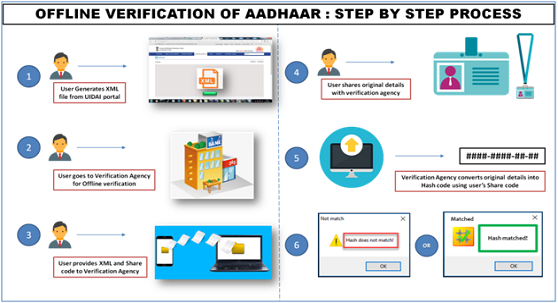
- ... Enter a Share Code which be the password for the ZIP file and click on ‘Download’ button • The Zip file containing the digitally signed XML will be downloaded to device wherein the above mentioned steps ...
- 15. How will service providers use Aadhaar Offline e-KYC?
- (Aadhaar Paperless Offline e-kyc)
- The process of Aadhaar Offline e-KYC Verification by Service Provider is: Once service provider obtains the ZIP file, it extracts the XML file using the password (share code) provided by the Aadhaar ...
- 16. My name is different in PAN and Aadhaar. It is not allowing me to link both. What to do?
- (PAN & Aadhaar)
- ... taxpayer when compared to the actual data in Aadhaar, One Time Password (Aadhaar OTP) will be sent to the mobile registered with Aadhaar. Taxpayers should ensure that the date of birth and gender in PAN ...
- 17. What is e-Aadhaar?
- (E-Aadhaar)
- e-Aadhaar is a password protected electronic copy of Aadhaar, digitally signed by UIDAI.
- 18. Requesting Entities
- (Uncategorised)
- ... authenticated using mechanisms such as password, Aadhaar authentication, etc. Personal Identity Data (PID) block captured for Aadhaar authentication should be encrypted during capture and should never ...
- 19. Glossary
- (Aapka Aadhaar)
- ... O OTP – One Time Password OTP is a one time personal identification number generally, sent to the mobile phone number for authentication framework. Operator Operator is the ...
- 20. Authentication Devices & Documents
- (Aadhaar Usage)
- Authentication devices are host devices/electronic actors that form a critical link in the Aadhaar authentication ecosystem. These devices collect personal identity data (PID) from Aadhaar number holders, ...
Aadhaar Telecast
View All play_circle_outline
 play_circle_outline
 play_circle_outline
 play_circle_outline
 play_circle_outline
Press Release
View All
UIDAI Data Hackathon 2026 Showcases Data-Driven Innovations for Inclusive Governance
12 May 2026
file_downloadDownload | Type: pdf | Size: 0.1 MB
Strong public adoption of new Aadhaar App, 21 million downloads in three months
7 May 2026
file_downloadDownload | Type: pdf | Size: 0.1 MB
UIDAI joins hands with NFSU to enhance cybersecurity and digital forensics resilience
6 May 2026
file_downloadDownload | Type: pdf | Size: 0.5 MB
Clarification on some news reports on the “new look” of Aadhaar
4 May 2026
file_downloadDownload | Type: pdf | Size: 0.1 MB
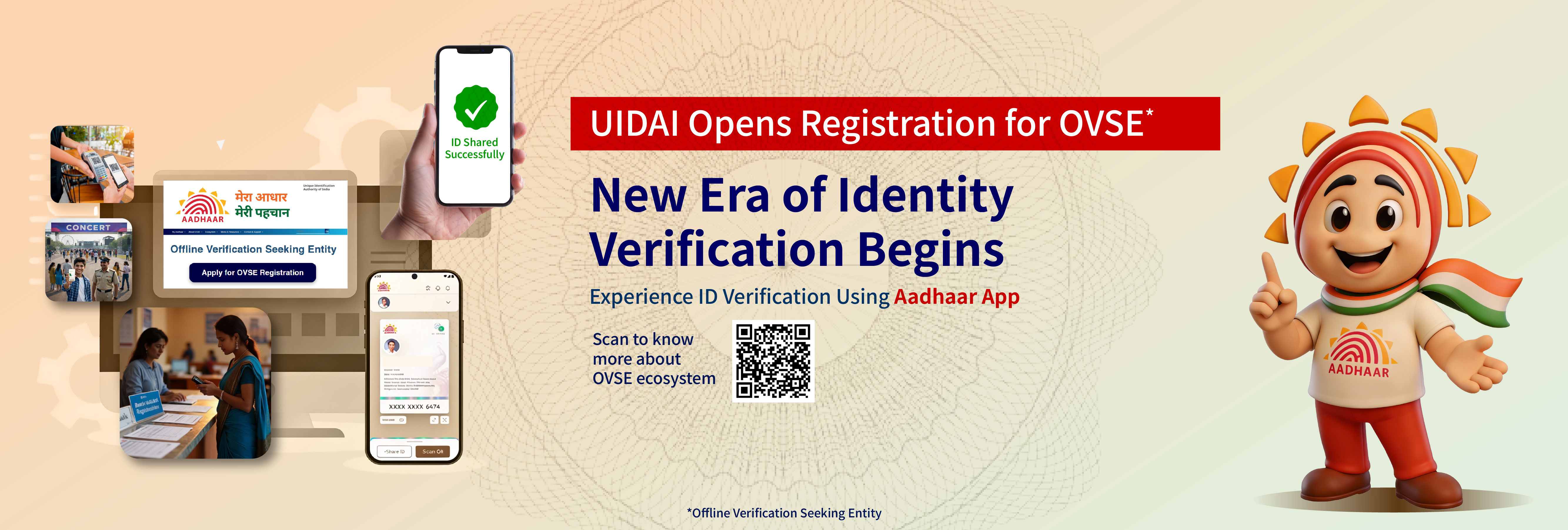
100 Entities Onboard to use Aadhaar-Based Offline Verification
21 Apr 2026
file_downloadDownload | Type: pdf | Size: 0.1 MB
Frequently Asked Questions